Powerful Features for Effective Discipleship

Explore RightNow Media’s features.
Collage of multiple digital screens showing various applications and interfaces including mobile phones, tablets, and computers with diverse content such as video playback, chat conversations, user profiles, and settings menus.Collage of multiple digital screens showing various applications and interfaces including mobile phones, tablets, and computers with diverse content such as video playback, chat conversations, user profiles, and settings menus.

Built-In Study Resources

All Your Bible Study Tools in One Place

Free Study Guides

Lead a small group discussion or go deeper in your personal study with free, comprehensive study guides—available with most RightNow Media Originals.

Smartphone screen showing a video paused at 10:17 with a man standing in an industrial-style room. Below is text about session goals for a study on salvation, emphasizing main idea, head change, heart change, and life change. Overlaid are UI elements including checkboxes for free study guides labeled Group, Youth, Family, and a card for a series titled ‘Salvation’ by Alan Platt with 3 sessions, 13-minute average, and a note that a free group study guide is included.

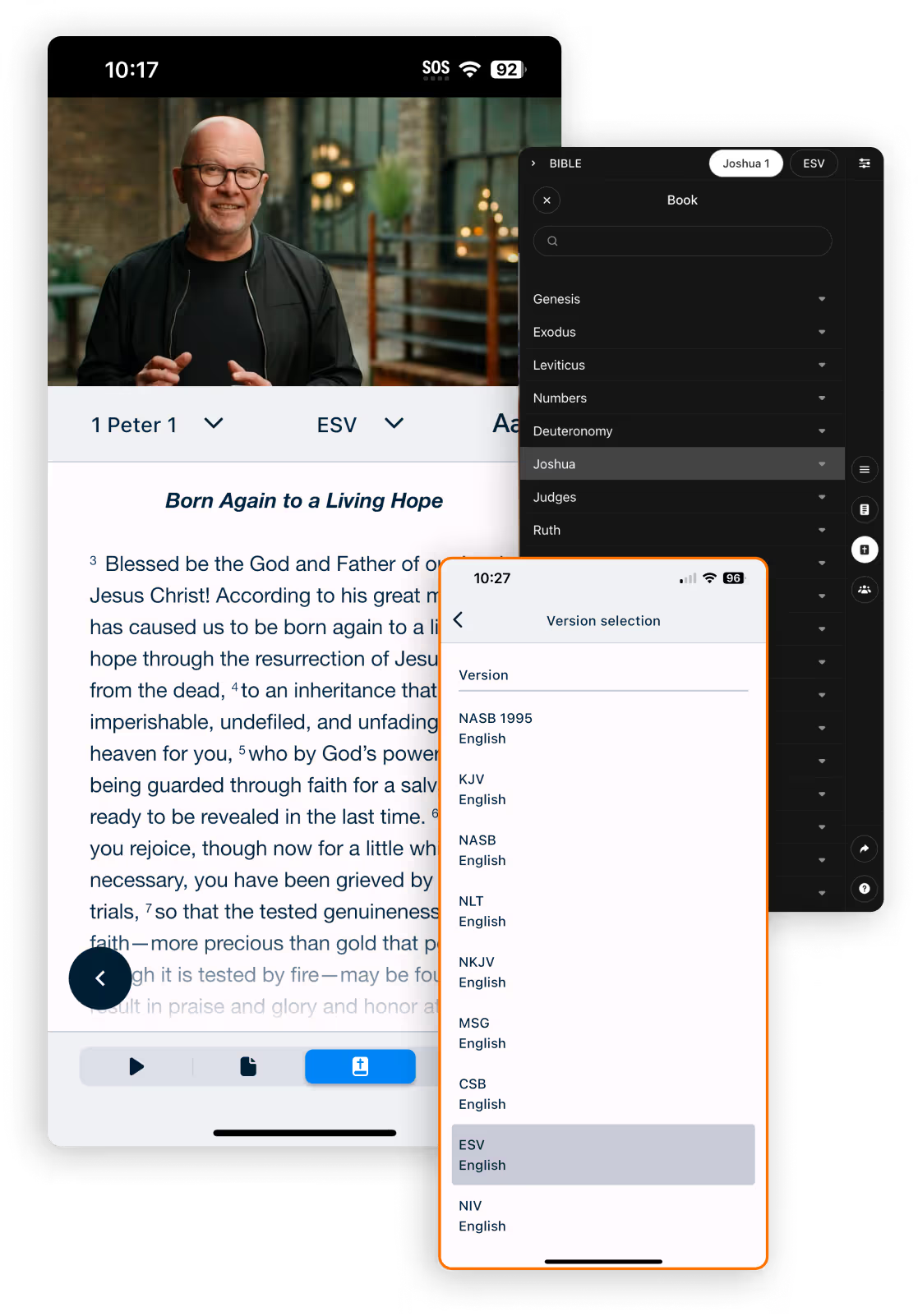
Built-In Bible Access

Read from multiple versions of the Bible while watching a video for a seamless viewing experience.

Screenshot of a Bible study app on a mobile device showing the passage 'Born Again to a Living Hope' from 1 Peter 1 in the English Standard Version (ESV). The screen displays verse 3 about being born again through the resurrection of Jesus Christ. Additional app menus are visible, including a book selection sidebar highlighting the book of Joshua and a version selection dropdown offering Bible versions like NASB, KJV, NLT, MSG, CSB, ESV, and NIV in English.
Learn More: Study Guides
Learn More: Bible Access

CUSTOM LIBRARY

Curate Content for Your Ministry

Feature Content

Use channels to organise and highlight content for your ministry.

Webpage banner for Grace Community Church with a forest background and white text stating 'We are disciples of Jesus making disciples in the everyday stuff of life.' Below the banner are book recommendations including titles like Nehemiah, Holiness, The Book of Judges, Greater Than, 40 Verses to Ignite Your Faith, The Book of Philippians, Love Does, and Your Time Is Now.

Your Ministry Videos

Embed your own content in your organisation’s custom library.

Tablet screen showing a content library app with sections for Adult Small Group Roadmap, Sermons, Youth Group Roadmap, and Pastor's Recommendations, displaying book and sermon covers with titles and authors including The Book of 1 Thessalonians by Ben Stuart, The Gospel of John by Tony Evans, Faith Foundations by David Platt, sermons titled Providence Live Stream, and various youth group and recommendation covers.

Filter Content

Hide content that doesn’t address your needs or that you want to save for later.

Screenshot of a Content Management settings page on RightNow Media with content titles, teachers, and publishers listed in a table. The interface includes options to hide content, filter by content type, and search. One content item 'Uncommon Grace' by Mike Kelsey from Maina Speaks is selected and highlighted in pink. Other visible titles include The Good Shepherd, Essentials of Faith by Lisa Harper, Frontstage/Backstage, The Generosity Practice, Faith Moves by W. Seth Martin, Scatter the Seed, and 30-Day Activate Your Yes Challenge.
Learn More

WATCH TOGETHER

Watch Bible Studies Virtually with Your Community

Stay connected with friends, family, and small groups by watching videos together on RightNow Media, even when you’re apart.

Invite

Invite any RightNow Media user to watch with you by sharing a custom link through email, text message, or social media.

Smartphone screen showing a group chat titled Small Group Chat with circular profile icons. A message from RightNow Media with its logo and link app.rightnowmedia.org is shown, followed by a blue text bubble saying "Let's go through the Gospel of Mark together!" and marked as delivered.

Discuss

Use the built-in video chat to discuss the video content with your group.

Video conference interface showing a middle-aged man with gray hair and beard smiling against a reddish background, with thumbnail images of seven participants along the top and a chat panel on the right containing messages discussing biblical references and study topics.
Learn More

INTERACTIVE CONTENT

Create Custom Training, Sermon Series, Surveys, and More

Tailor Content to Your Needs

Customise your content with response boxes, polls, multiple-choice questions, and more.

Mobile screen showing a Bible study series assignment titled 'Mark 1:1-13' for Jane Smith, with a video thumbnail of Francis Chan. Overlay shows a 'New Slide' menu with slide type options: Bible Verse, Document, Image, Long Response, Multiple Choice, Rank Items, Short Response, Text, and Video. A ranked item question asks Jane Smith to rank preferred meeting days: Wednesday nights, Friday nights, Saturday mornings, and Sunday afternoons.

Flexible Settings

Control who can view and edit your interactive content with privacy and collaborator settings.

Settings interface showing the Collaborators and Privacy sections: Two collaborators listed with names and emails: Grace Smith (gracesmith@gracecommunitychurch.com) and Noah Collins (noahcollins@gmail.com), with an input box for adding a new collaborator (johnwilson@gmail.com). Privacy options below include Private (only sent people access) and Public (everyone in the organization has access), with Public selected. A toggle for 'Track all responses' is enabled, allowing all collaborators to see responses.

Track Completions

Assign content for group leaders or group members and see when the assignments are completed.

User interface for sending a Test Bible Study Series by email, showing input fields for email addresses, list name, and due date, with a button labeled 'Send Now'. A pop-up window displays completion tracking for Adam Sanderson with email adamsanderson@gmail.com sorted by Completed status, showing assigned date 10/25/24, started date 10/26/24, completed date 10/28/24, and due date 11/1/24, with a 'View responses' button below.
Learn More

Mobile App Features

Enjoy features designed to enhance your experience on the RightNow Media mobile app.
Mobile app screen showing playback of a video session titled 'Unashamed' by Lecrae, with 6 sessions averaging 9 minutes each from 2023. Video is at 32 seconds of 1 minute 7 seconds. Options to share, bookmark, and download are visible. A free study guide labeled 'Group' is offered, and a section titled 'Living Out Loud for Christ' states, 'Being confident in our faith isn’t always easy.' A trailer labeled 'Trailer 1 min' with a city skyline background is partially visible at the bottom.

Audio-Only Mode

Listen to Bible study series without video while you’re on the go to preserve your device’s power and data consumption.

Offline Playback

Download videos to watch anywhere, even without internet access.

Screencasting

Conveniently stream your favourite content from your device to your TV.
Enjoy features designed to enhance your experience on the RightNow Media mobile app.

Available on Your Favourite Devices

Available on all major devices
Give everyone in your ministry access to RightNow Media.
Get Started
Vertical gradient background blending soft pastel hues of peach and lavender fading into white.